§Introduction
This Python script allows you to extract frames from a video file and save them into a zip file. The frames are saved as PNG images. The script also includes a progress bar and error handling. more on Github.
§Dependencies
The script requires the following Python libraries:
- OpenCV (
cv2) oszipfiletqdm
You can install these dependencies using pip:
pip install opencv-python tqdm
§Usage
To use the script, you need to provide the path to the video file and the output folder where the frames will be saved. The script will create a zip file named frames.zip in the output folder.
Here is the main function of the script:
def extract_frames(video_path, output_folder):
    # Fix the provided paths to remove non-printable characters
    video_path = fix_path(video_path)
    output_folder = fix_path(output_folder)

    try:
        os.makedirs(output_folder)
    except OSError:
        if not os.path.isdir(output_folder):
            raise

    video = cv2.VideoCapture(video_path)

    if not video.isOpened():
        print("Error: Could not open the video file.")
        return

    frame_count = 0
    frames = []

    # Get the total number of frames for the progress bar
    total_frames = int(video.get(cv2.CAP_PROP_FRAME_COUNT))

    with tqdm(total=total_frames, unit="frame") as pbar:
        while True:
            ret, frame = video.read()
            if not ret:
                break

            output_path = os.path.join(output_folder, f"frame_{frame_count}.png")

            try:
                cv2.imwrite(output_path, frame)
            except Exception as e:
                print(f"Error writing frame {frame_count}: {e}")
                continue

            frames.append(output_path)
            frame_count += 1
            pbar.update(1)

    video.release()

    # Extract the filename (without extension) from the video path
    video_filename = os.path.splitext(os.path.basename(video_path))[0]
    zip_file_path = os.path.join(output_folder, f"{video_filename}_frames.zip")

    with zipfile.ZipFile(zip_file_path, 'w', zipfile.ZIP_STORED) as zipf:
        for frame_path in tqdm(frames, unit="frame", desc="Zipping frames"):
            try:
                # Use os.path.relpath to get rid of the absolute path and keep only relative paths
                zipf.write(frame_path, os.path.relpath(frame_path, output_folder))
            except Exception as e:
                print(f"Error adding frame to ZIP: {e}")
                continue

    # Clean up: Delete individual frame files
    for frame_path in tqdm(frames, unit="frame", desc="Cleaning up"):
        try:
            os.remove(frame_path)
        except Exception as e:
            print(f"Error removing temporary frame file: {e}")

    print(f"Video processing completed successfully.")

    # Display the size of the zip file
    zip_file_size = os.path.getsize(zip_file_path)
    print(f"Size of the zip file: {zip_file_size / (1024 * 1024):.2f} MB")
You can run the script in the terminal as follows:
python script.py
When prompted, enter the path to the video file and the output folder:
Enter the path to the video file: /path/to/video.mp4
Enter the path to the output folder: /path/to/output/folder
The script will then extract the frames from the video and save them into a zip file in the output folder. The progress of the extraction process will be displayed in the terminal. If any errors occur during the extraction or zipping process, they will be printed to the terminal.
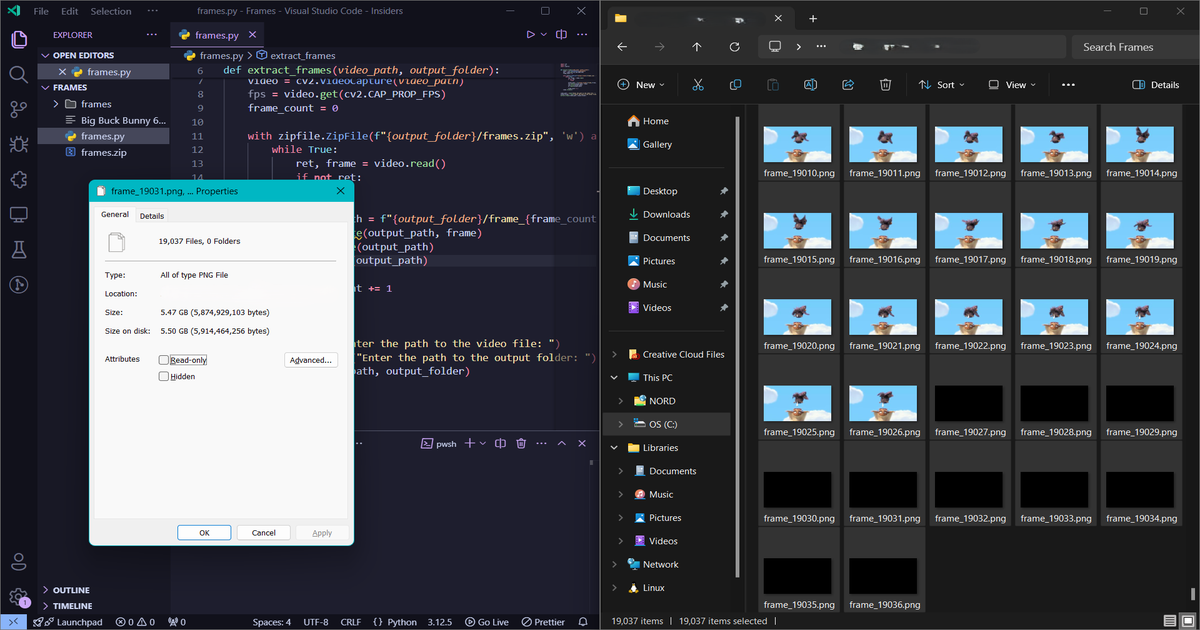
Caution This script extracts every frame from a video and saves them as lossless PNG images, preserving high image quality but consuming significant disk space. A 60 FPS video generates 60 images per second, quickly leading to thousands of files and several gigabytes of data. Users should ensure sufficient storage, confirm the output location’s capacity, and note that high-resolution videos require more space and longer processing time.
Testing the script on a short video is recommended to gauge storage needs before handling larger files.