I was sharing code snippets with the person at the next desk and kept having to open Gmail to do it. At some point I got tired of it.
The obvious fix was email from the terminal. PowerShell has Send-MailMessage, but it was marked obsolete in PowerShell 7 for not supporting modern TLS properly. The alternative is dropping down to System.Net.Mail.SmtpClient directly, which is also technically deprecated in .NET in favour of MailKit, but it still works and it does not require installing anything.
Gmail requires an App Password rather than your account password for SMTP access. Two-factor authentication has to be enabled on the account first.
The script prompts for a recipient and subject, then opens Notepad for the body. Notepad is the bluntest possible multiline input method, but it works without dependencies and without fighting the terminal over newlines. When you close it the body text comes back and the mail goes out.
# Email configuration
$emailHost = 'smtp.gmail.com'
$emailPort = 587
$emailUser = 'your-address@gmail.com'
$emailPassword = 'your-app-password'

function Read-MultilineInput {
    $temp = [System.IO.Path]::GetTempFileName()
    Set-Content -Path $temp -Value "Enter your email body here. Save and close Notepad when done."

    $notepad = Start-Process notepad.exe -ArgumentList $temp -PassThru
    $notepad.WaitForExit()

    $body = Get-Content -Path $temp -Raw
    Remove-Item -Path $temp
    return $body
}

$from        = $emailUser
$to          = Read-Host "Recipient address(es), comma-separated"
$toAddresses = $to -split ',' | ForEach-Object { $_.Trim() }
$subject     = Read-Host "Subject"

Write-Host "Notepad will open. Write your message, save, and close it."
$bodyText = Read-MultilineInput

if ([string]::IsNullOrWhiteSpace($bodyText)) {
    Write-Host "Body is empty. Aborting."
    exit
}

try {
    $smtp = New-Object Net.Mail.SmtpClient($emailHost, $emailPort)
    $smtp.EnableSsl = $true
    $smtp.Credentials = New-Object System.Net.NetworkCredential($emailUser, $emailPassword)

    $msg = New-Object System.Net.Mail.MailMessage
    $msg.From = $from
    foreach ($addr in $toAddresses) { $msg.To.Add($addr) }
    $msg.Subject = $subject
    $msg.Body    = $bodyText

    $smtp.Send($msg)
    Write-Host "Sent."
} catch {
    Write-Host "Failed: $_"
}

$null = $Host.UI.RawUI.ReadKey('NoEcho,IncludeKeyDown')
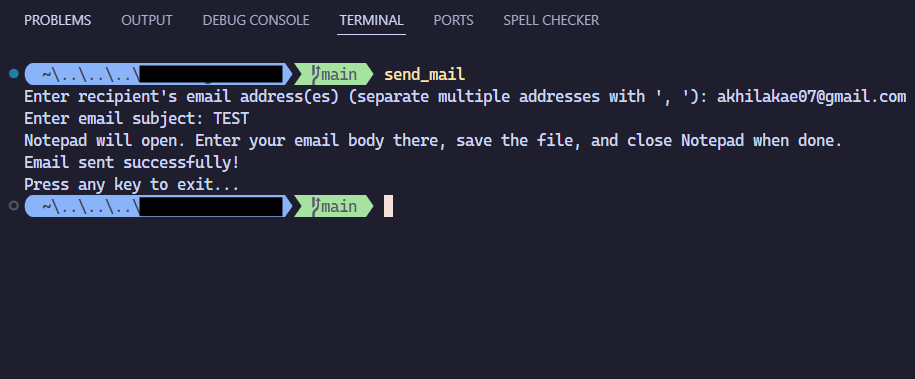
To call it without thinking, wire it up in your PowerShell profile as a function that invokes the script:
function send-mail { & "$HOME\Scripts\send_mail.ps1" }
That is the whole thing. No dependencies, no setup beyond the App Password, no extra window to open. The Notepad step is clunky but the alternative is fighting PowerShell’s Read-Host into accepting newlines, which is worse.
The obvious downside is that this is a test implementation. SmtpClient is deprecated upstream and the credentials are sitting in plaintext. It does not handle attachments, HTML bodies, or anything beyond plain text. For anything beyond quick internal sharing, use a real mail library or a dedicated tool.